Obesity medicine & GLP-1 programs
Semaglutide and tirzepatide patients, brand or compounded: titration steps, missed doses, GI effects and weight trend in one place.
For clinicians · The Provider Report
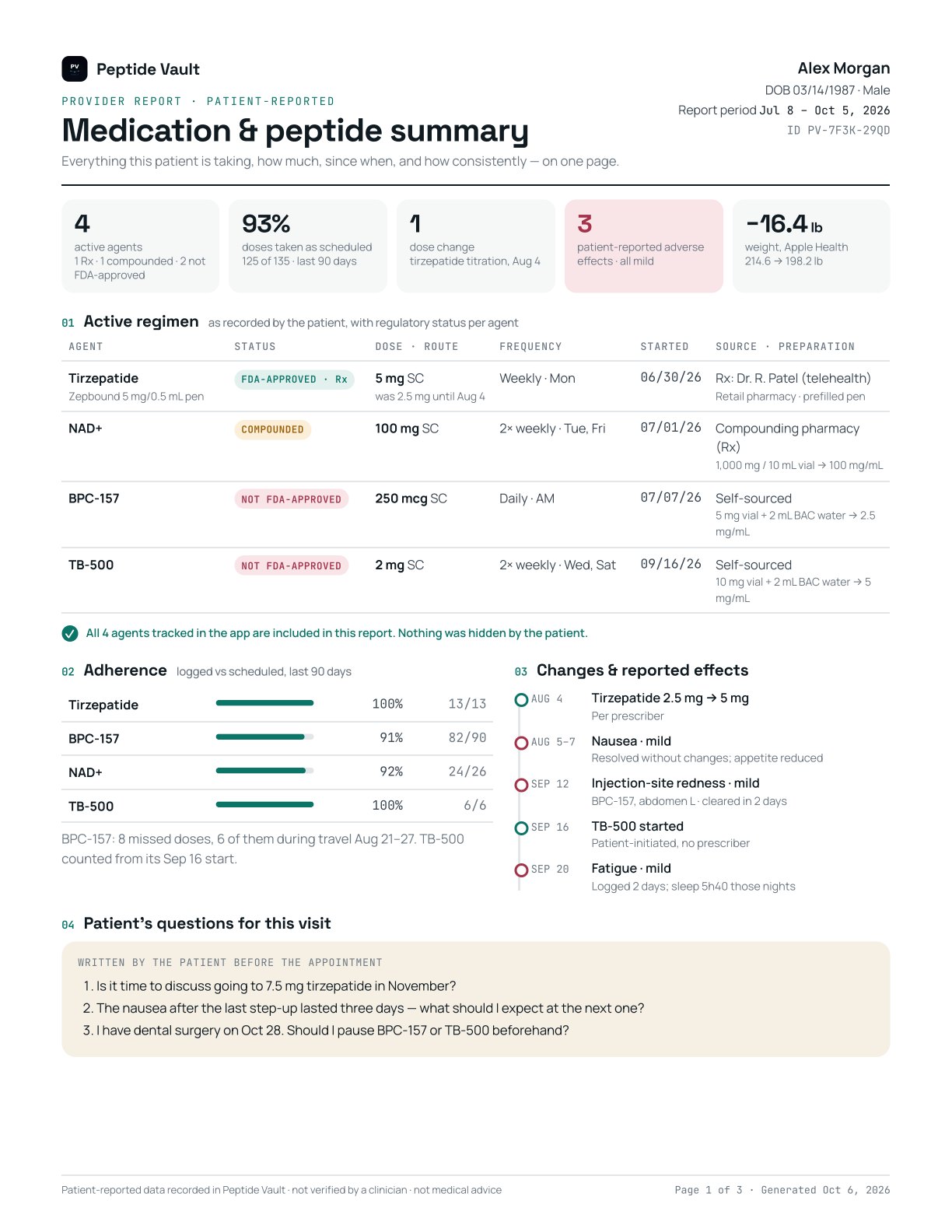
A one-page, patient-generated summary of every GLP-1, prescription, compounded and self-sourced peptide your patient uses: dose, frequency, start date, source and FDA status, plus adherence, titration history and the side effects they noticed.
In development · sample uses a fictional patient
Why it exists
Patients on GLP-1s and peptides often run more than one agent, from more than one source: a prescription, a compounding pharmacy, something they bought on their own. In a fifteen-minute visit, the list you get is whatever they remember, and the self-sourced items are the ones most likely to go unmentioned.
The Provider Report replaces recollection with what the patient actually logged, the day they logged it. Each agent carries its regulatory status, so nothing important hides in the middle of a list, and the dose history is already organized the way you would review it.
Who it’s for
Semaglutide and tirzepatide patients, brand or compounded: titration steps, missed doses, GI effects and weight trend in one place.
Patients who stack a prescribed protocol with peptides they found on their own. See all of it, with source and status per agent.
Recovery-focused patients using injectable peptides alongside rehab. Know what they were taking, and since when, before a procedure or a new plan.
Multi-agent regimens are the norm. A dated, structured log beats a screenshot of a notes app.
The patient who mentions “a few peptides” at the end of the visit. The report turns that into a reviewable list.
Medication reconciliation, interaction review and patient counseling start from what was actually logged.
What you get
01 · Reconciliation
Prescribed, compounded and self-sourced agents on one table. If the patient leaves anything out, page one says so.
02 · Regulatory status
Status comes from Peptide Vault’s reference library, not from the patient, so you can see at a glance what needs a closer conversation.
03 · Titration & adherence
Every step-up dated, adherence per agent over 30 or 90 days. Useful for GLP-1 titration decisions without reconstructing history from memory.
04 · Safety signals
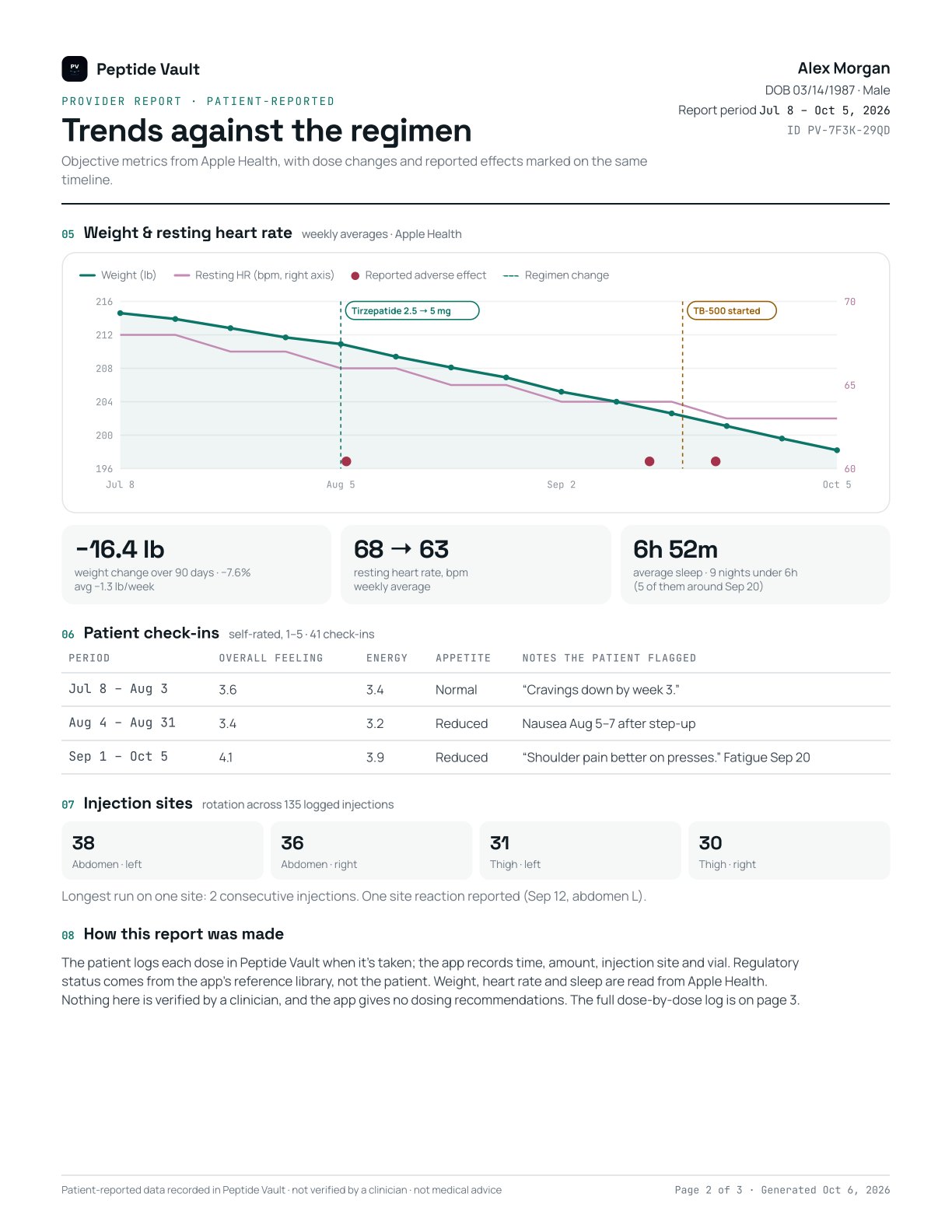
Patient-reported effects with dates and severity, plotted next to dose changes and Apple Health weight, heart rate and sleep.
05 · Visit agenda
Patients add their questions before they export, so the conversation starts where it matters.
06 · No integration
The patient generates the PDF on their phone and shares it with you however you prefer. Nothing is uploaded to Peptide Vault’s servers.
Page one
Pages two & three
When it helps
A complete current-regimen list on day one, including compounded and self-sourced agents.
Dated dose steps, adherence and the side effects that followed each change.
What was taken, and when the last dose was logged, when timing matters.
Symptoms with dates and severity, next to every regimen change in the same window.
The patient sends the PDF before the call, so the visit starts with the facts on screen.
A portable record the patient can hand to a new clinician, specialist or pharmacist.
Where every field comes from
| Field | Source | Notes |
|---|---|---|
| Agent, dose, frequency, route | Patient | Entered when the protocol is set up; each change is dated. |
| Regulatory status | Peptide Vault library | FDA-approved Rx, compounded, or not FDA-approved for human use. Not editable by the patient. |
| Each dose: time, amount, site | Patient | Logged at the time of the dose; skipped doses can be marked with a reason. |
| Vial preparation & concentration | Patient + app arithmetic | Vial size and diluent are entered; concentration is calculated, not estimated. |
| Prescriber, pharmacy, source | Patient (optional) | Free text; shown as reported. |
| Side effects & check-ins | Patient | Dated, with self-rated severity. |
| Weight, resting heart rate, sleep | Apple Health | Read with the patient’s permission; device-measured where available. |
| Adherence | App calculation | Logged doses ÷ scheduled doses for each agent over the report period. |
How it works
Each dose when it’s taken: time, amount, site, vial. Side effects and check-ins as they happen.
On their phone, for the last 30 or 90 days, with their questions for you added.
Print, email, AirDrop or your patient portal. The PDF is made on the device; nothing is uploaded.
Peptide Vault stores the patient’s log on their phone. The report is generated there and shared by the patient. We don’t receive it, store it, or send it anywhere on a practice’s behalf. Once a patient gives it to you, handle it as you would any patient-provided document.
Early access for practices
We’re working with a small group of clinicians to shape the report before it ships: what to show, what to cut, what would make your visits faster. Practices also get patient handouts explaining how to bring the report to an appointment.
Questions clinicians ask
No. It is a patient-generated summary of what they logged in a personal tracking app. Treat it the way you would any document a patient brings in: useful, structured, and patient-reported.
Nobody, and the report says so on every page. Doses, sites and side effects are logged by the patient. Weight, heart rate and sleep come from Apple Health. Regulatory status comes from our reference library, not the patient.
Never. The app records what the patient logs and does arithmetic, such as a vial’s concentration. It gives no dosing, sourcing or treatment advice, and it doesn’t sell anything.
Yes. If they do, page one states how many tracked items were excluded. Most clinicians would rather know there is a gap than not.
No. It covers prescription GLP-1s like semaglutide and tirzepatide, compounded preparations, and research peptides, each labeled with its regulatory status.
As a PDF the patient prints, emails, AirDrops or uploads to your portal, with the full dose log attached as a CSV. If your practice needs a different format, tell us.
No. The report is created on the patient’s phone from data stored on that phone, and shared by the patient. Nothing is uploaded to our servers.
Nothing. Patients create the report in the app. If you would like to recommend it to patients, get patient handouts, or help shape the report, email us.
The Provider Report is in development now; the sample on this page shows the format. Practices that email providers@peptidevaulttracker.com get early access and a say in what it includes.